Anime Vanguards Unit Leveling and Evolution Guide
Feed UnitFood or fuse donor units to level an Anime Vanguards unit, then follow a sourced evolution checklist and Saint-part acquisition example.
Open Inventory → Units, select the recipient, and use Feed with UnitFood or Fuse with unwanted donor copies. Check the XP preview and consume only what you intend. Evolution is a separate Upgrades → Evolve action with unit-specific Items and Others requirements.
View reference image
On this page
Level a normal unit with Feed or Fuse
For an ordinary unit, the direct inventory actions are Feed and Fuse. Feed consumes UnitFood to add unit experience; Fuse consumes selected donor units to give experience to the unit you keep. These are different from evolving into a new form, rerolling a trait, or reaching a player-account level gate.
The current anniversary inventory is visible at 1:22 in TrueShinobi’s October 12 recording: the selected unit has a level and experience bar, with separate Feed and Fuse actions on the right. The community Items reference identifies UnitFood as leveling consumables, while its FAQ distinguishes unit XP from player XP and documents fusion. We use that mechanic without copying old per-item XP values or old six-act farming routes.
Feed an owned unit step by step
- In the lobby, open Inventory, stay on the Units tab and select the unit that will receive experience. Confirm its name and form on the right-hand card; do not choose only by its thumbnail.
- Choose Feed. Select owned UnitFood in the feeding view. Food is the resource being converted into XP; Gems, Trait Rerolls, essence stones and Cake Slices are not interchangeable XP food.
- Add the quantity you intend to consume and read the experience preview. The archived developer update notes document a total-XP display and bulk-food selection; use the live preview rather than adding old wiki values by hand.
- Check the selected recipient and any displayed cost before confirming. Start with a small batch when learning the interface instead of committing the whole food inventory automatically.
- Confirm the feeding action, then inspect the recipient’s level and XP bar. A higher account level elsewhere on the screen is not the result you are checking here.
Food examples in the item reference include Green Bean, Ramen and Crystal. Those names help you recognize the item category; they are not a recommendation to farm their old listed acts. The anniversary Story selector has changed, so an archived source saying “Acts 1–6” should not be turned into a current route. Check the owned item’s description and the current activity reward panel before choosing where to obtain more.
Use Fuse only with units you intend to consume
Open the intended recipient in Units and choose Fuse, then select donor copies in the fusion selector. Review both sides of the transaction before confirming: the receiving unit stays, while the selected donors supply experience and are consumed. Fusion is therefore an alternative resource decision, not a free improvement to every selected unit.
The FAQ records that donor rarity affects the XP supplied. This guide deliberately omits its numeric rarity-to-XP table because we have not measured the current values on an anniversary account. Read the preview for the units you actually select. Do not fuse an unfamiliar unit simply because it has a low level: it may be a copy you wanted to keep for another team or progression task.
For a first attempt, remove any donor you cannot confidently identify. Verify the recipient, the donor list and the predicted result, then confirm only the intended batch. Reopen the recipient afterward to check its XP bar. That gives you a concrete result without assuming that a successful fusion also completed an evolution quest.
Decide what resource problem you have
If the unit has room to gain XP but you own no food, the immediate problem is obtaining UnitFood or deciding whether you have expendable donor copies. Opening a banner is not itself the leveling action. Likewise, an inventory full of evolution stones does not mean you have XP food available.
The recorded Story Stages selector offers Act 1, Exp Rush, Infinite and Sandbox for Planet Namak at 2:35. That provides concrete activities to inspect when planning a leveling session. We have not independently measured which XP track or food payout each current Exp Rush clear supplies, so compare the activity’s result with the recipient’s XP or the food you actually receive before repeating it as a unit-leveling farm. Feed and Fuse remain the verified inventory conversion actions.
If your level improves but the unit still cannot evolve, stop feeding long enough to inspect the evolution requirement. More ordinary XP does not replace a named material, takedown condition or special quest. Use the mode selection guide to connect the remaining requirement to a specific activity.
Evolve a unit through the Upgrades area
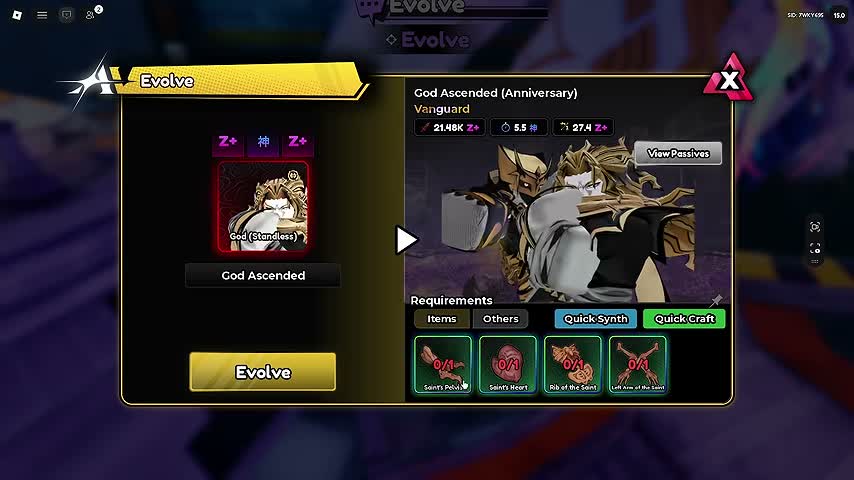
Evolution changes a unit’s form. The anniversary footage shows the Upgrades area and the Evolve interface, including a unit-selection screen, result preview, Requirements tabs and the final Evolve action. Select the base unit you intend to transform, then read both Items and Others rather than stopping at the first visible material.
At 2:56 in AB Plays’ October 12 recording, God (Standless) is selected and God Ascended (Anniversary) is shown as the result. Four Saint-part counters appear under Items. That is a useful worked example of a unit-specific recipe; those objects are not a universal evolution cost for every unit.
The recorded Update 15.0 log explains the four sources. Saint’s Heart comes from anniversary summons; Rib of the Saint is associated with True Shadow Monarch ownership; Left Arm of the Saint comes through Shadow Trials; and Saint’s Pelvis is sold in the anniversary shop. The source panel also says the parts can be collected again after evolving. We omit its probabilities and currency amounts because availability and current account conditions should be checked before spending.
Work through the Saint-part example in order
First confirm that the selected unit is actually God (Standless) and that the displayed target form matches the evolution you want. Next inspect which of the four counters is incomplete. A missing Heart sends you toward the anniversary summon system; a missing Left Arm sends you toward Shadow Trials. Neither is solved simply by adding more ordinary unit XP.
For the Pelvis route, inspect St. Itchas’ 2nd Anniversary Shop and its current item cost. The official in-game notes connect ordinary stage clears and Anniversary Dungeon acts with Cake Slices ’26, the event currency used in that shop. This gives you a complete decision chain: missing item → shop → named currency → activity that supplies that currency. It is more specific than farming whichever mode you already find comfortable.
When a requirement depends on True Shadow Monarch ownership, recognize it as an access dependency rather than an unlucky farming streak. This page is not a complete True Shadow Monarch acquisition walkthrough. Keep that project separate from a smaller evolution you can complete with your present account.
Keep the special System out of ordinary leveling
The official anniversary presentation distinguishes True Shadow Monarch’s normal unit level from a dedicated System progression. It also describes special attacks, weapons, shadows and class choices. Those features belong to that unit’s broader system; they do not change the fact that a normal unit’s Feed and Fuse actions work on its ordinary XP track.
When a feature remains locked after feeding, read the lock label. A System feature may need System progress, while an evolution may need a specific material or quest. Do not spend the same resource repeatedly against a requirement that is clearly asking for something else. Rerolls and Stat Chips are separate improvement tools as well, not substitutes for UnitFood.
Verify the improvement against the task
After feeding or evolving, return to the activity that exposed the weakness. Keep enough of the team and opening plan unchanged to see whether the improvement affected the original problem. A larger level number does not tell you whether the unit is affordable early enough, covering the right part of the path or contributing to the target you struggle with.
Use the beginner guide if the real blocker is team setup rather than a missing resource. Return to the Anime Vanguards hub for the dated source videos. This guide explains the verified inventory actions and a recorded evolution example; it does not claim a tested fastest XP farm, a universal unit cap or a complete recipe database.
Step-by-step guide
- Feed UnitFood to the selected recipient
Open Inventory, select the unit under Units, choose Feed, add owned UnitFood, review the XP and cost preview, then confirm and check the unit XP bar.
- Fuse expendable donor units for XP
Select the receiving unit, choose Fuse, review which donor copies will be consumed and confirm only the intended batch; inspect the recipient afterward.
- Evolve through the unit-specific checklist
In Upgrades, open Evolve and select the base form. Inspect the resulting form and both Items and Others tabs, obtain missing requirements, then review the final action.
Quick reference
Ordinary unit level versus evolution
| Goal | Action | Resource or requirement | Check afterward |
|---|---|---|---|
| Add unit XP with food | Inventory → Units → recipient → Feed | Owned UnitFood, such as Green Bean, Ramen or Crystal | Recipient level and XP bar |
| Add unit XP using spare copies | Recipient → Fuse → choose donors | Selected donor units are consumed | Recipient XP; retained units still present |
| Change the unit form | Upgrades → Evolve → select base | Unit-specific Items and Others requirements | Correct resulting form |
| Unlock a True Shadow Monarch System feature | Read that unit-specific System requirement | Dedicated progression, not ordinary food alone | The intended System feature unlocks |
God Ascended example: follow the missing Saint part
Sources shown in the recorded Update 15.0 log; no probability or fixed current price is asserted.
| Missing item | Recorded route | Next action |
|---|---|---|
| Saint’s Heart | Anniversary summons | Inspect Anniversary 26 banner and summon information |
| Rib of the Saint | True Shadow Monarch ownership | Check the owner requirement before farming unrelated stages |
| Left Arm of the Saint | Shadow Trials | Read current trial access and enemy/reward conditions |
| Saint’s Pelvis | Anniversary shop | Inspect St. Itchas shop and required Cake Slices 26 |
Video evidence
Watch creator walkthroughs alongside this guide. Check the recording date before following requirements that may have changed.
NEW Best BEGINNER'S Guide To Start Anime Vanguards! (2nd Anniversary)
A dated anniversary walkthrough to compare with your current lobby. Requirements and availability should be checked in the live game.
Vanguards: 2nd Anniversary
Explains the anniversary update and True Shadow Monarch special progression. A developer presentation, not independent playtesting.
How To Get ALL *NEW* Units IN The 2ND Anniversary Of Anime Vanguards!
Shows the anniversary lobby, banner information, in-game update log and evolution requirement panel; the guide cites dated visual examples, not universal recipes.
FAQ
Does feeding a unit complete its evolution?
Feeding UnitFood adds ordinary unit XP. Evolution uses the separate Evolve interface and may require specific items, takedowns, Gold or special conditions shown in the unit’s checklist.
What is consumed when I use Fuse?
The donor units you select supply experience and are consumed. Verify the recipient, donor list and preview before confirming, and do not assume that every low-level or duplicate unit is expendable.
Sources
Recheck these links whenever the game version, release status, or strategy changes.
- Official Roblox experience: Vanguards: 2nd Anniversary Kitawari; place 16146832113, universe 5578556129. Official identity and core unit loop checked 15 October 2026.
- Roblox official universe details Identity, current listing title and description captured on 15 October 2026.
- Vanguards: 2nd Anniversary official presentation Vanguards, 10 October 2026. Official presentation and English captions checked; special System progression is specific to True Shadow Monarch.
- AB Plays: anniversary unit sources and menus 12 October 2026; visual inspection of lobby at 0:32, Update 15.0 log at 1:58 and Evolve requirement panel at 2:56. Captions were rate limited; no transcript-only claims used.
- TrueShinobi: current unit inventory and mode selectors 12 Oct 2026 gameplay visually checked: 1:22 Feed/Fuse, 2:35 Story entries, 8:22 Lunar Bridge, 13:37 Anniversary Dungeon, 14:12 Legend reward navigation. Captions unavailable; only recorded visuals are used.
- Anime Vanguards Wiki: UnitFood items Community reference, retrieved through its indexed text on 15 Oct 2026; direct page returned a challenge/error. Used for food classification and names only, not archived XP values or act routes.
- Anime Vanguards Wiki: player XP versus unit XP Indexed community FAQ distinguishes Unit XP, player XP and fusion. Numeric rates and old farming recommendations are not copied as current facts.
- Anime Vanguards Wiki: archived developer updates Historical feed-interface description: food queue and total XP preview. Current Feed/Fuse actions visually cross-checked in 12 Oct anniversary footage.